
 Find a branch
 Contact
 Help
Help
Control your cards in one place.
Manage your debit and credit cards from wherever you are, whenever you want, with simple and secure controls in Westpac One® digital banking.
You’re in control 24/7.
- Instant peace of mind – Block, unblock, or replace your cards straight away.
- Personalised security – Stop specific types of transactions from being made on your card, like ATM cash withdrawals.
- All in one place – Manage your cards from the comfort of your couch.
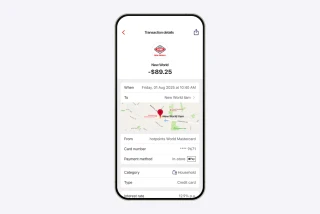
It’s easier to check your spending.
Card transactions in Westpac One now include more information, like clearer business names and additional details¹. This will give you more clarity and confidence when checking your spending and help you spot anything unusual faster.
Now, when you tap on a card transaction, you can check²:
- Clear business names and logos¹ – so you can instantly recognise where you shopped.
- Accurate date and time of the purchase
- How you paid – for example if you paid instore using a digital wallet.
If something still doesn't look right, you can let us know by selecting "I need help with this transaction" at the bottom of the transaction screen.
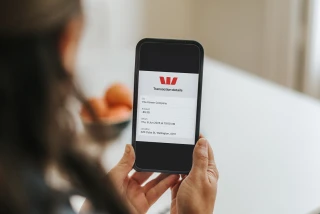
Sharing card payment information.
In Westpac One you can now share confirmation of a card transaction you've made. Just tap the the share icon at the top of the Transaction screen to view and share a summary of the payment. This will show the recipient’s account name, the amount paid and the payment date.
Manage your card 24/ 7.
Block or unblock your card anytime
Misplaced your physical card? Block it instantly, and the digital version of your card will be blocked too. Unblocking it is just as easy.
Change your card PIN
Help keep your money safe by setting or changing your PIN whenever you want.
Add to your digital wallet
Add your debit or credit card to your digital wallet or smartwatch, and pay on the go.

Replace a lost or stolen card
If your card has been lost or stolen, replace it with a new digital version that's ready to use straight away, and a new physical card.
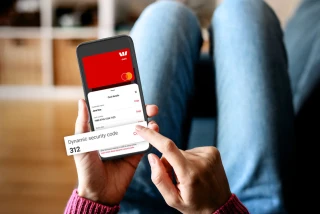
A safer way to pay with your digital card.
For extra peace of mind when shopping online, head to the Westpac One app to use your digital card details, including the dynamic security code that changes after 24 hours³.
Personalised security with card controls.

Contactless payments
Turn contactless card payments on or off. Contactless payments let you pay by tapping your card, without inserting it or entering a PIN for transactions under $200 in New Zealand.
ATM cash withdrawal
Prevent your card from making cash withdrawals at ATMs from any linked accounts.

Automatic card updates
When your card is replaced upon expiry, your new card details will automatically update with most businesses, apps and online stores where your card is saved for recurring payments.
Online shopping
Prevent purchases when your physical card isn’t present, including online shopping and phone orders. This may also stop you from setting up new recurring payments or subscriptions with your card, but it won’t affect existing ones.

Gambling transactions
You can stop most gambling transactions on your eligible debit and credit cards, including payments at casinos and gambling or lottery outlets, websites and apps.
Where to find card controls in Westpac One.
In the Westpac One app
- Log in and select Cards from the bottom menu.
- Swipe to choose the card you’d like to use.
- Scroll down to see all the available card controls.
In Westpac One online banking
- Log in to Westpac One on your browser.
- Select Manage cards in the left hand menu.
- Choose a card to see all of the options available.
Things you should know.
Eligibility criteria, lending criteria, terms and conditions apply.
Conditions of Use for the applicable card apply.
Rates, transaction and services fees apply.
1Where available. Some information may not be displayed for all transactions, including those made online or overseas. Where available, maps will show for card transactions you’ve made in store. Some merchant information displayed on a transaction is provided by our third party service provider. Westpac cannot guarantee the accuracy or completeness of these merchant details.
2Some card payment information may update as the transaction moves from ‘pending’ to ‘processed’.
3Dynamic security code is available for all eligible Westpac debit and credit Mastercard customers. Excludes Business Mastercard, Business Prepaid Mastercard and Global Currency Cards.
Westpac One App Terms and Conditions which incorporate Westpac’s General Terms and Conditions and the Westpac Website Terms of Use apply.