
 Find a branch
 Contact
 Help
Help
How your replacement credit or debit card is updated and how to turn updates off.
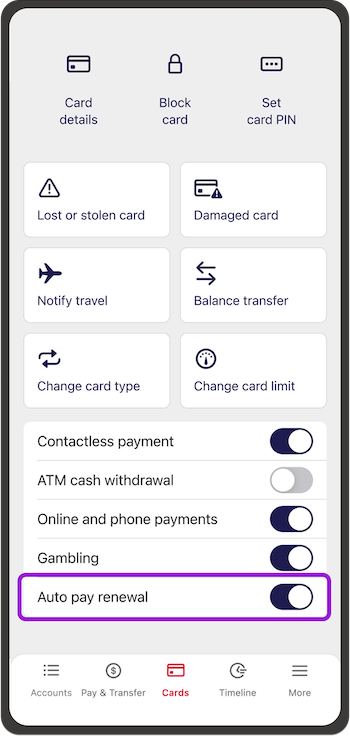
Mastercard’s® Automatic Billing Updater (called Auto Pay Renewal in the app) automatically updates your card details with replacement* credit or debit card details for recurring payments and any card details stored on apps or online stores.
About Automatic Billing Updater.
All customers with a Westpac credit or debit Mastercard® are automatically opted into automatic card updates. It’s free, there’s nothing you need to do to turn it on, and it applies to all credit and debit cards under your account, including joint and additional cards.
How to turn automatic updates off.
In the app:
- Select Cards
- Choose your card
- Go to Auto Pay renewal and turn the switch off.
In online banking:
-
- Select Manage cards
- Choose your card
- Go to Automatic Billing Updater and turn the switch off.
Places where your card may be stored.
Some examples of where you might store your card details are:
• Online retailers like Amazon, TradeMe or Apple
• Movies, music or eBook services like Netflix, Spotify or Kindle
• Cashless transportation services like Uber or Doordash
• Online payment services like PayPal or Western Union.
Don't use digital banking?
If you don’t use digital banking, you can call us to turn it off on 0800 888 111 weekdays 7am to 8pm and on weekends or public holidays 8am to 5pm.
Things you should know.
*Replacement card details are those cards which have expired or have been replaced with another Westpac card. If your card was lost, stolen or replaced due to fraud this service does not apply.
Not all shops and merchants have opted in to provide this service, so when you get a new card, you’ll still need to check if your card details have been updated as your payments may decline.
Credit card and Debit Mastercard Conditions of Use for the applicable card apply.
Rates, transaction and services fees apply.
Mastercard is a registered trademark and the circles design is a trademark of Mastercard International Incorporated.
