
 Find a branch
 Contact
 Help
Help
Pay with Points.
Pay with points, anytime, anywhere. When you use your hotpoints Mastercard®, you’ll earn points that can be turned into something special*.
Welcome to hotpoints.
Use your hotpoints Mastercard for your everyday spending, and your points will add up - and then you can use them to pay for anything you buy with your card*.
What does Pay with Points mean?
Just turn on hotpoints Pay® in the Westpac One® app and your hotpoints will automatically go towards your next purchase with your hotpoints® Mastercard**. It feels like free when you pay with points – and you can even use points on purchases you’ve already made.
What can I use Pay with Points for?
How do I Pay with Points?
1. Log into hotpoints from Westpac One® digital banking.
2. Select ‘hotpoints’ under your accounts.
3. Turn on hotpoints Pay for your next purchase.
4. Your points will be used next time you make a purchase with your hotpoints Mastercard.
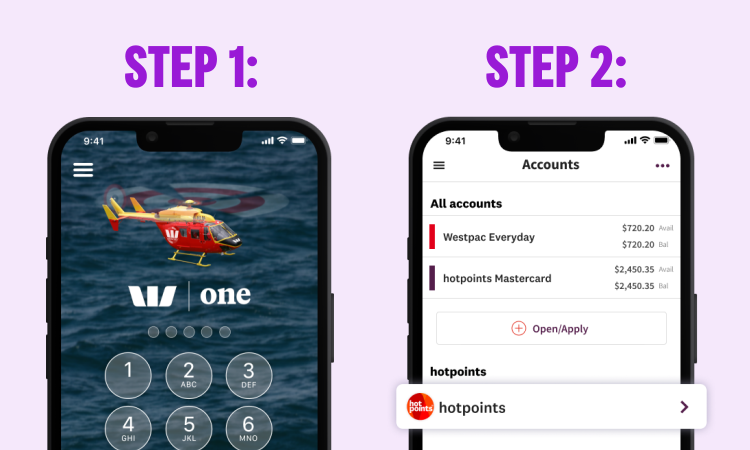
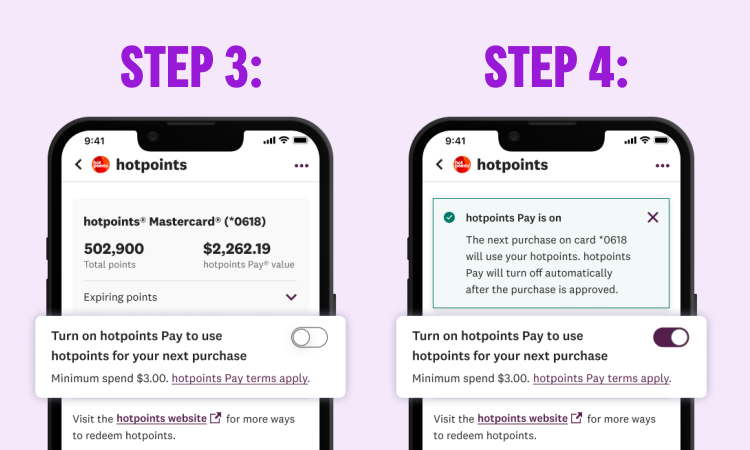
After you use your points, a statement credit for that dollar amount will appear on your account within two business days.
If we have your mobile number on file, you'll receive a text message to confirm whether the redemption was successful. Make sure your mobile number is up-to-date to receive these notifications.
Please note, you'll need at least $3 value of hotpoints to use hotpoints Pay. When you turn on hotpoints Pay, it will only use your hotpoints for your next transaction - it will not remain turned on for subsequent transactions.
How do I Pay with Points for purchases I've already made?
1. Log into hotpoints from Westpac One® digital banking.
2. Select ‘hotpoints’ under your accounts.
3. Select ‘Visit the hotpoints website for more ways to redeem hotpoints’.
4. When you land on the hotpoints website, click on the hotpoints Pay tile.
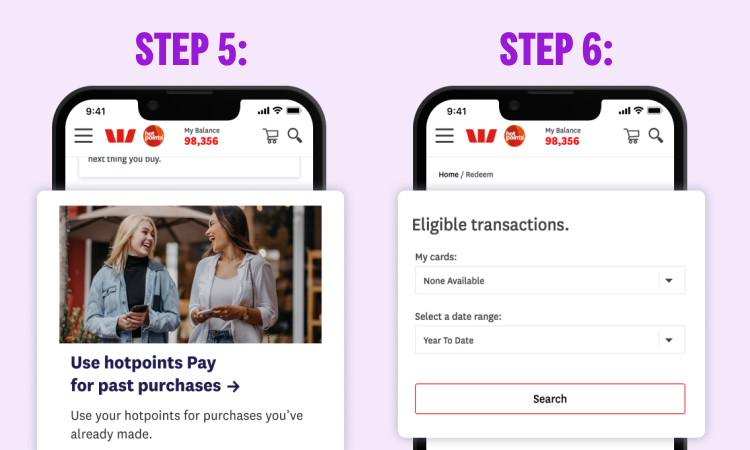
5. This will direct you to the hotpoints Pay page where you can click ‘Use hotpoints Pay for past purchases’.
6. Select your card and date range and then search your transactions for the purchase you would like to redeem your points on.
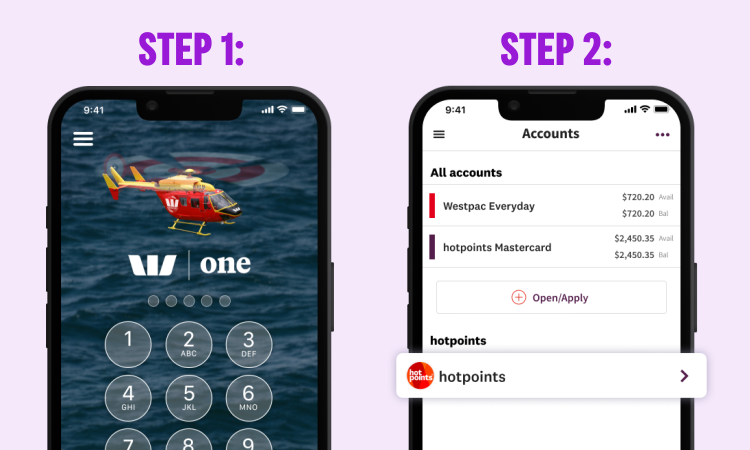
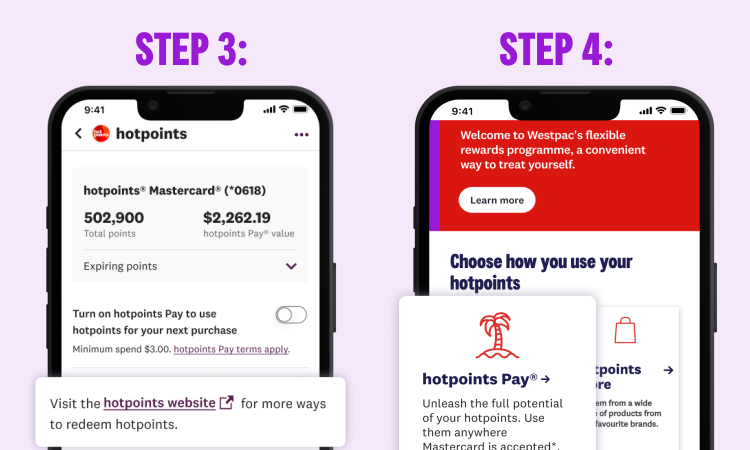
If we have your email address, we’ll send you a confirmation email. To use your hotpoints for another past purchase, simply go back to your transaction list and choose another transaction.
FAQs.
More questions on hotpoints Pay or credit cards? Get extra help & support.
Things you should know.
*Certain purchases and transactions are not eligible to earn hotpoints. See the applicable Credit Card Conditions of Use for full details.
**Hotpoints terms and conditions apply. hotpoints Pay can be used to cover the cost of eligible transactions made with a hotpoints Mastercard (or linked payment instrument). There is a minimum number of hotpoints that must be earned before you are eligible to use hotpoints Pay. See the applicable Credit Card Conditions of Use for full details.
If you only make the minimum payment each month, you will pay more interest and it will take you longer to pay off the unpaid balance.
Westpac is not the supplier of the goods and services that can be redeemed with hotpoints and does not guarantee the obligations of the supplier or any goods and services supplied. Any goods or services that are provided by a third party supplier may be withdrawn at any time.
hotpoints® and hotpoints Pay® are registered trademarks of Westpac Banking Corporation.
Mastercard® is a registered trademark and the circles design is a trademark of Mastercard International Incorporated.
Terms and conditions
Eligibility criteria, lending criteria, terms and conditions apply. See: