 Find a branch
 Contact
 Help
Help
Changes to your Choices Home Loan account.
If we’ve contacted you about changes to your Choices Home Loan, here’s a quick guide to help you change your account, or move your cards and payments to a transaction account.
Change the account your card is linked to, or cancel it.
To cancel the card linked to your account, or to link it to a different account, call us on 0800 400 600 or +64 9 912 8000 from overseas (charges apply), weekdays 7am to 8pm or weekends 8am to 5pm, contact your relationship manager or visit your local branch.
Change or cancel your direct debits.
Contact the company you're paying to ask them to cancel the direct debit or change the account they take your payments from:
- Log into their app
- Search for "direct debit" on their website
- Call or email them.
Learn more about direct debits or choose from these options for some step-by-step instructions.
Open a transaction account or change your home loan.
Its quick and easy to open a new Everyday transaction account in Westpac One® digital banking to make payments:
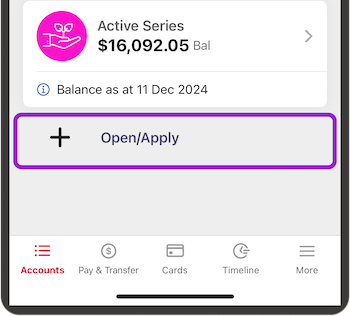
- Go to Accounts
- Choose + Open / Apply (you might have to scroll down in the app)
- Follow the steps.
If you don't have Westpac One digital banking, or want to change your Choices loan to a Choices Everyday Floating loan which you can use for payments and deposits, call us on 0800 400 600 or +64 9 912 8000 from overseas (charges apply), weekdays 7am to 8pm or weekends 8am to 5pm, contact your relationship manager or visit your local branch.
Change or cancel automatic payments.
Its quick, easy and instant to change or cancel an automatic payment in Westpac One digital banking.
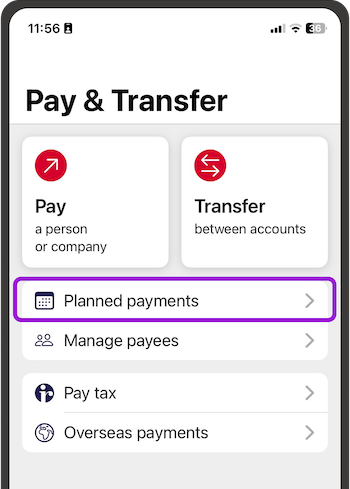
- Go to Pay & transfer, then Planned payments
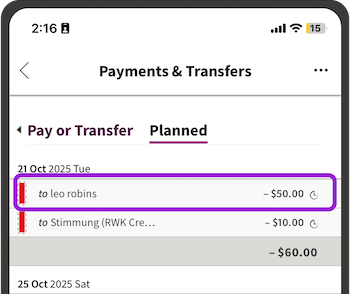
- Choose the payment you want to change, then choose the three dots
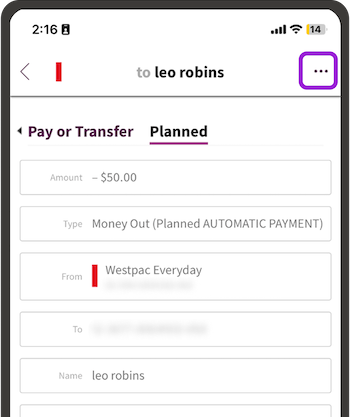
- To change the account the payment comes out of
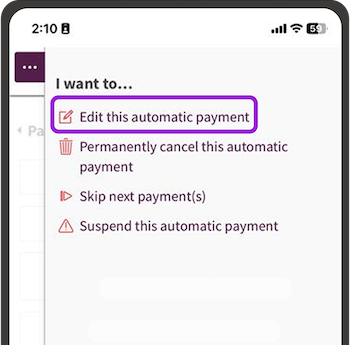
- Choose Edit this automatic payment
- Then type the new account number in the From field
- Then choose Update.
- To cancel, choose Permanently cancel this automatic payment, then Yes cancel.