
 Find a branch
 Contact
 Help
Help
How to dispute a credit or debit Mastercard® transaction.
If there’s a Westpac credit or debit Mastercard transaction in digital banking or on your statement that doesn’t seem right, here's what to do next.
Check the details, contact the merchant, then raise the dispute with us within 30 days from the date at the top of your Mastercard or account statement.
For example, if the transaction you're disputing was on 1 June it will show on your July statement. You have 30 days from the July statement date to raise a dispute with us.
1. Check the details.
Check the details of the transaction in digital banking. The merchant you paid can use a different name, or another company to do the billing for them. The order confirmation, invoice or receipt could help too.
Learn more about why a transaction shows as pending.
2. Check you can dispute.
You can dispute a transaction if:
- You've ordered a product or service and haven't received it
- The product is damaged or different from what you ordered, or it is counterfeit
- You've asked to cancel your subscription, but you're still being charged
- The transaction on your statement is not what you agreed to pay, or it's different from the amount on the receipt or invoice
- You've been promised a credit or refund but haven't received it
- You've paid twice, or you’ve paid another way and your card has also been charged.
You can’t dispute a transaction if:
- You've changed your mind about what you bought, you’re not happy with the quality of the service, or you've found the same thing cheaper somewhere else
- You haven’t cancelled your subscription
- You have a billing or contract-related dispute with the merchant
- You have a software download-related dispute with the merchant.
If there are charges on your account that you didn't authorise or you suspect fraud, call us immediately day or night on 0800 400 600 (+64 9 912 8000 from overseas, international toll charges apply).
3. Contact the merchant.
If the transaction still doesn’t seem right after you’ve checked the details, contact the merchant. Keep a copy of your emails or messages to them, as well as any receipts or invoices.
4. Raise the dispute with us.
If the transaction is something you can dispute and the merchant doesn’t solve it:
- In the Westpac One® app or online banking:
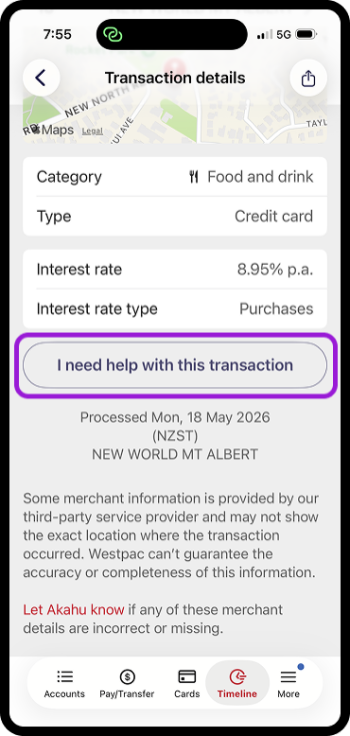
- Go to Accounts then choose the account, or go Timeline
- Select the transaction you want to dispute
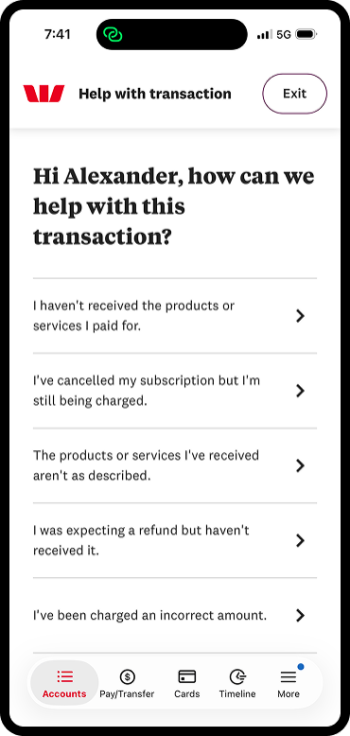
- Then select I need help with this transaction
- Follow the steps.
- Or go to the Mastercard® Debit or Credit Card Disputes online form on our website and follow the steps.
To make investigating disputes faster, we’ll ask you for PDF, or JPEG or PNG screenshots of complete documents showing:
- Your order confirmation with:
- Details of what was ordered
- Contact details for the merchant
- The amount and the date you paid, and
- Emails with the merchant’s email address, the dates sent and received, and what was communicated. If the dispute is that:
- A subscription was cancelled, the documents or screenshots must show you cancelled your subscription and requested a refund
- You didn’t get the goods or services, the documents or screenshots must show you told the merchant and asked for a refund
- You were charged twice, the documents or screenshots must show you told the merchant and asked for a refund
- The product is damaged or faulty, the documents or screenshots must show you told the merchant and asked for a refund or replacement. Also send us photos of the product ordered and what was received
- A refund wasn’t right, the documents or screenshots must show that you told the merchant and must include the details of any refund amounts and dates.
Important: We can’t use screenshots that only show parts of documents or emails. The more you can share with us, the faster we’ll be able to investigate.
If you can't use online forms.
The fastest and easiest way to raise a dispute is in your digital banking or on the website. If you can’t use these forms, contact us as soon as you can after you’ve contacted the merchant, we’re here to help:
- Call 0800 888 111 weekdays 7am and 8pm or 8am to 5pm weekends and public holidays, or from overseas +64 9 912 8000 (international toll charges apply).
- Visit your nearest branch.
5. We'll send a reference number.
We’ll send a reference number within 10 days of you raising the dispute. Keep this number handy if we contact you.
Cancel the dispute.
If you need to cancel your dispute with us:
If you lodged the dispute in the Westpac One app or online banking:
In the app:
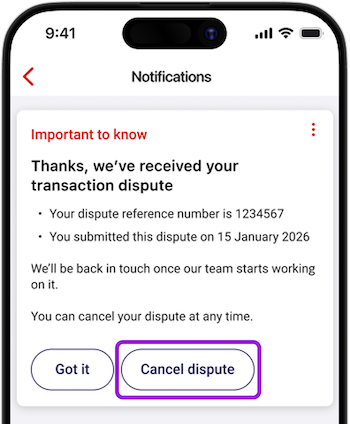
- Go to More from the bottom menu, then choose Notifications
- Choose the notification you got when you lodged the dispute with us
- Select Cancel dispute then Yes cancel
- We’ll send another notification confirming that the dispute has been cancelled.
In online banking:
- Go to Notifications on the top menu if you’re on a computer
If you’re on your phone, go to Notifications in the bottom right - Choose the notification you got when you lodged the dispute with us
- Select Cancel dispute then Yes cancel
- We’ll send another notification confirming that the dispute has been cancelled.
If you raised the dispute over the phone:
- Visit your nearest branch or call 0800 888 111 between 7am and 8pm on weekdays or between 8am to to 5pm on weekends and public holidays, or call +64 9 912 8000 from overseas (international toll charges apply)
- Advise us that you'd like to cancel the dispute.
Things you should know.
This page is provided for information purposes only. If the transaction is found to be valid, you will be required to make payment.
For more information, check the Conditions of Use for the applicable card.
Mastercard® is a registered trademark and the circles design is a trademark of Mastercard International Incorporated.
