
 Find a branch
 Contact
 Help
Help
How do I find my Westpac One® Customer ID and choose my own username?
Choosing your own username makes it easier to log in to Westpac One® digital banking and to reset your password yourself. Find your Customer ID and choose your own username in your Westpac One Profile.
In the app:
- Go to More from the bottom menu
(Your Customer ID is on this screen above Log out)
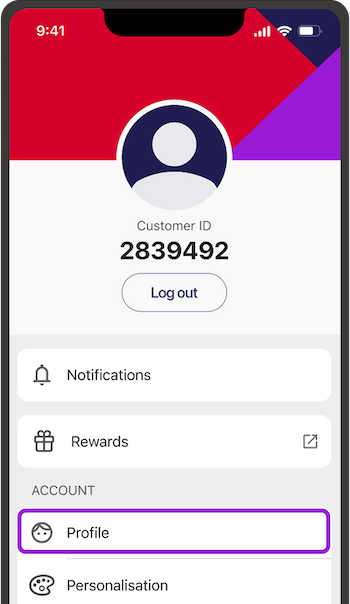
- Choose Profile, then:
- iPhone or iPad users, select Security settings
- Android users, select Security details
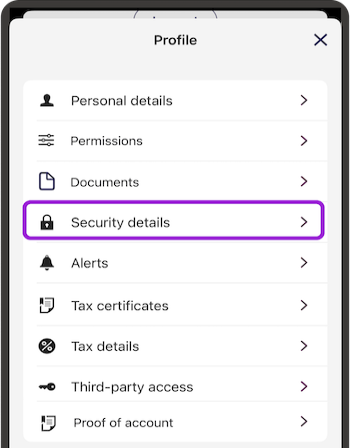
- Go to Edit under Customer ID / Username

- Type the username you’d like to log in with, then Apply
Your username must:- Be between 4-20 characters
- Have at least one letter
- Use letters and numbers only (not have any spaces or special characters)
- Not be an email address
- Be unique - if someone else is already using that name, you'll need to choose another. Don't reuse one you're already using to log into another account
- Log in next time with your new username, or use it to reset your password.
Take a minute to check we’ve got the right phone number for password resets.
Video.
In online banking:
- Go to Profile from the top menu if you’re on a computer or tablet.
If you’re on your phone, select the three dots in the top right of the screen, then Profile

- Choose Security settings.
Your Customer ID is on this screen. If you've chosen your own username and want to check your Customer ID:- Go to Edit under Customer ID / Username
- Select and delete your Username
- Your Customer ID will show
- Choose Cancel to keep your username, or choose Apply to go back to using your Customer ID to log in.
- To choose your own username, select Edit under Customer ID / Username
- Type the username you’d like to log in with, then Apply.
Your username must- Be between 4-20 characters
- Have at least one letter
- Use letters and numbers only (not have any spaces or special characters
- Not be an email address
- Be unique - if someone else if already using that name, you'll need to choose another. Don't reuse one you're already using to log into another account
- Log in next time with your new username, or use it to reset your password. Take a minute to check we’ve got the right phone number for password resets.
Tips for choosing your username.
- Keep it short.
- Keep it safe. Don’t use things that are easy for others to find like your email, full name or address.
- Make it easy. Avoid symbols or special characters you might forget.
Can’t log in to Westpac One?
If you’ve signed up for digital banking and you’ve forgotten your username or Customer ID, you’ll need to call us on 0800 400 600 (weekdays 7am to 8pm, weekends and public holidays 8am to 5pm) or visit a branch to check what it is.
If you’ve forgotten your password and know your username or Customer ID and the mobile phone number we for you, you can reset your password and log in yourself.
Not registered for Westpac One?
When you join Westpac, we’ll give you a Customer ID to use for your digital banking. If you’re already a customer and want to start using digital banking, call us on 0800 400 600 and press 6 (weekdays 7am to 8pm, weekends and public holidays 8am to 5pm) or book an appointment at your local branch.
Learn more about registering and logging in to digital banking.
