
 Find a branch
 Contact
 Help
Help
How do I find my loan documents in Westpac One digital banking?
Your loan documents are saved securely in one place under your Profile.
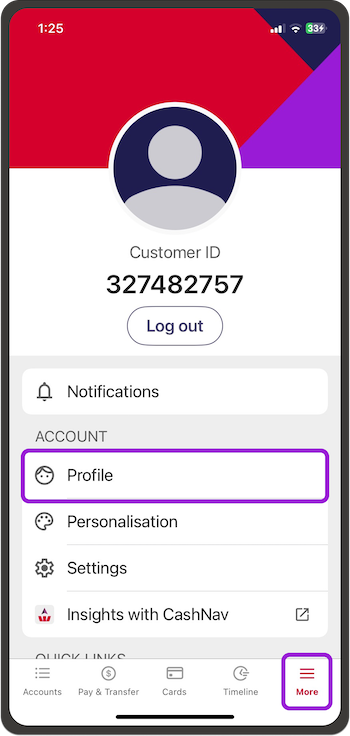
In the app:
- Go to More from the bottom menu, then Profile
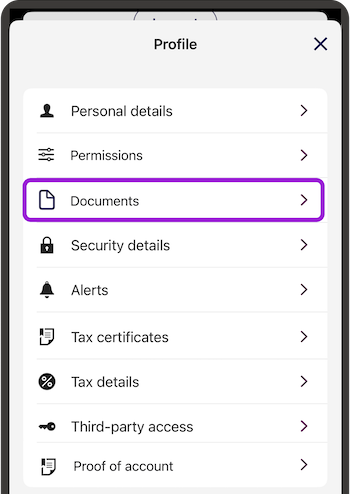
- Select Documents
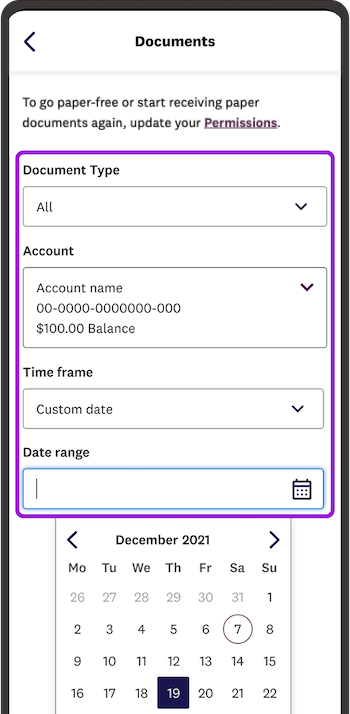
- Choose the Account, Document Type and Timeframe.
For statements go to how do I check transactions and get statements?
In online banking:
- Go to Profile from the top menu if you're on a computer.
If you're on your phone go to the three dots in the top right, then Profile - Then choose Documents
- Choose the Account, Document Type and Timeframe.
For statements go to how do I check transactions and get statements?
