
 Find a branch
 Contact
 Help
Help
How do I receive documents digitally?
Turning off paper documents means we'll send information to your email address, or send it to you within Westpac One® digital banking. You can change this setting anytime in digital banking, or by contacting us.
In the app:
- Go to More from the bottom menu
- Choose Profile
- Choose Permissions
- Then choose Documents
-
Tick the box next to All, or choose which products to get digital copies of documents for by choosing the tick box next to each product.
-
Once you have completed your selection, choose Confirm.
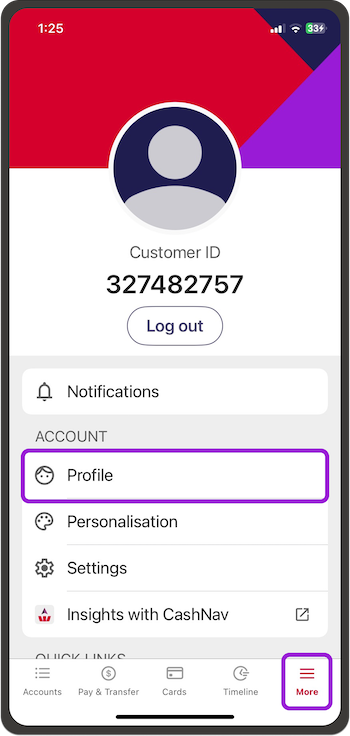
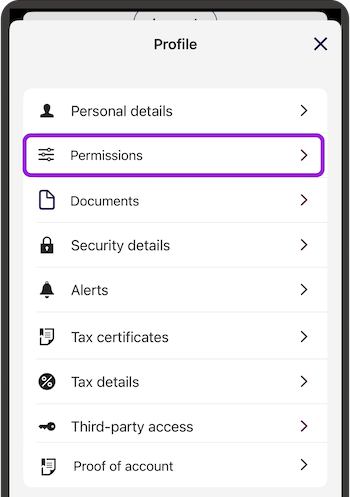
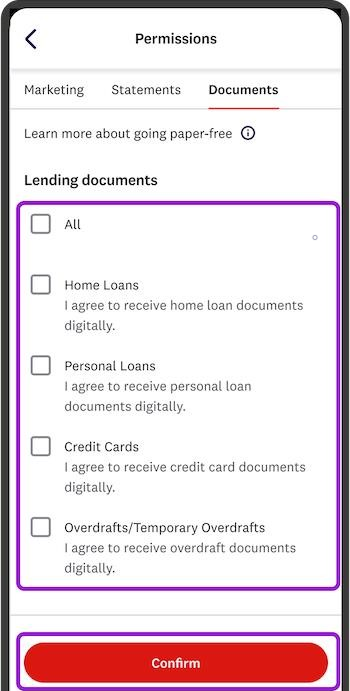
To start receiving paper documents again.
Untick the products that you'd like to start receiving hardcopies of documents for, then Confirm.
In online banking:
- Go to Profile from the top menu if you're on a computer.
If you're on your phone go to the three dots in the top right, then Profile - Choose Contact preferences
- Then choose Documents
-
Tick the box next to All to select all products.
You can also select specific products only by choosing the tick box next to each product. -
Once you have completed your selection, choose Confirm.
To start receiving paper documents again.
Untick the products that you'd like to start receiving hardcopies of documents for, then Confirm.
