
 Find a branch
 Contact
 Help
Help
How can I control online shopping with digital banking?
In Westpac One® digital banking, you can easily stop your credit or debit card from being used to shop online and over the phone.
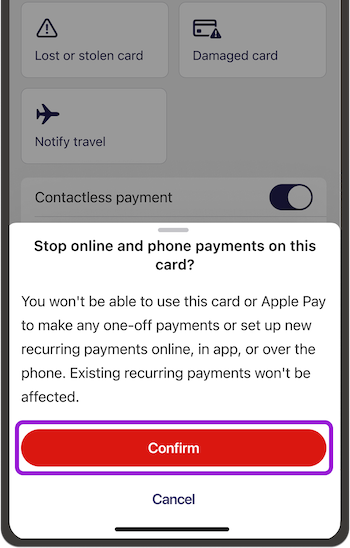
You can control both one-off purchases and new recurring payments made with your card. It won’t change any existing recurring payments that you’ve already set up.
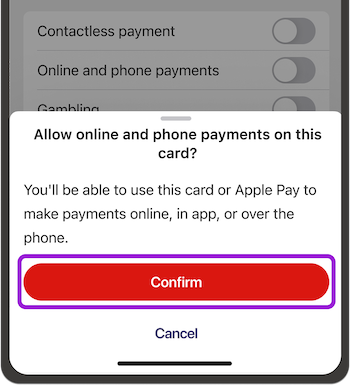
You can allow online and phone payments again at any time, with the same switch.
In the app:
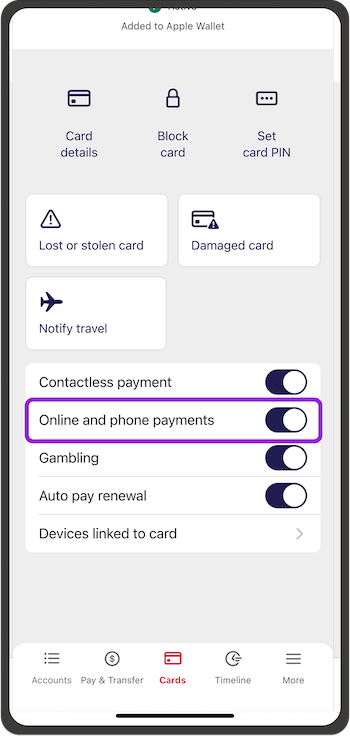
- Go to Cards from the bottom menu
- If you have more than one card, swipe to choose the card you want to stop online shopping for
- Turn Online and phone payments on or off, then select Confirm.
In online banking:
- Go to Manage my cards from the menu on the left if you're on a computer. If you're on your phone, go to Cards from the bottom menu
- Choose the card, turn Online and phone payments on or off, then select Confirm.
Things you should know.
If you're not set up for digital banking, you can call us on 0800 400 600 weekdays between 7am and 8pm and on weekends or public holidays between 8am to 5pm.
Conditions of Use for your card applies. Rates, transaction and services fees apply.
Learn more about credit cards.
