
 Find a branch
 Contact
 Help
Help
How do I pause or change my Split?
You can find, pause or change your Splits from Pay/Transfer in your Westpac One® app.
In the app:
- Go to Pay/Transfer from the bottom menu
- Choose Split
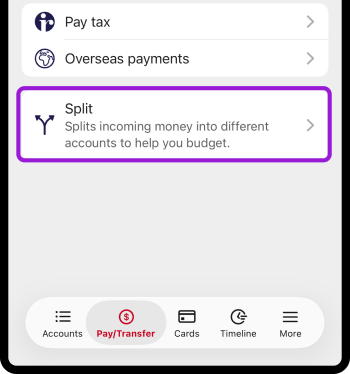
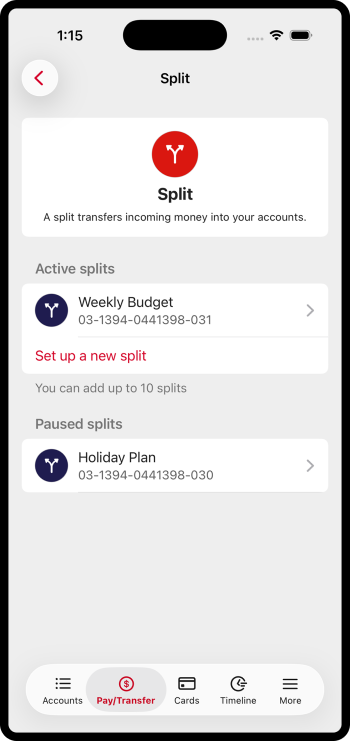
- Choose the split you want to pause or change
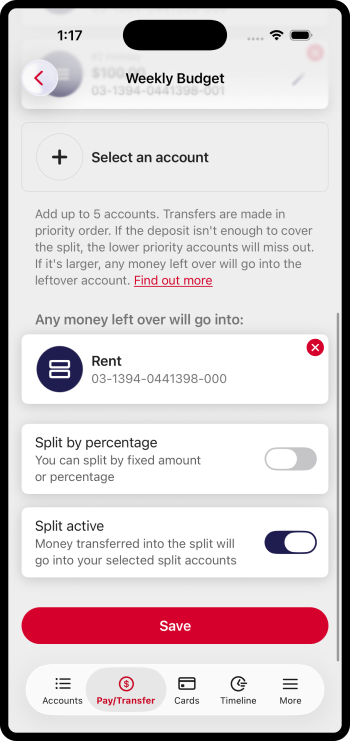
- Select the pencil icon to change the amount going into an account
- To add a new account to split money into, choose Select an account
- To change the account Any money left over goes into, select the x on the top right corner of that account
- To select a Split by percentage, swipe the switch to the right. To select Split by fixed amount, swipe the switch to the left.
- Turn the Split active switch on or off to pause or restart a split.
Overseas payments.
Payments from overseas will not be split.
Where overseas payments cannot be allocated according to your split settings, they will be deposited into the account with the lowest suffix within your Split settings.
If two accounts share the same lowest suffix, the funds will be deposited into the account with the higher priority in your Split settings.
Learn more.
- Split
- How do I split my income into different accounts in the Westpac One app?
- More app and online banking how-to guides
Things you should know.
You can split your income across a maximum of five accounts and any leftover will go into the leftover account.
You can set up as many as 10 splits.
If you pause a Split, all money paid into your Split account will go directly into your leftover account.
Split is only available in the version of the Westpac One app released in September 2026. You may need to update your app to use it.
Use your new Split number from the Pay/Transfer screen for any incoming money you want to split between your accounts.
You choose and can change the order your money is allocated to each account. If the incomings aren’t enough to cover all Split amounts, the money will be allocated in that order.
If someone sends money to a closed Split account, we'll trace the payment and help return it to your account.
Your Split won’t affect any of your automatic payments or direct debits.
If you're an authorised signatory on an account, it may be available to add to your split, even if it is not listed in your Westpac One. Moving money to it as part of your split won’t give you access to view or manage the account.
