
 Find a branch
 Contact
 Help
Help
How do I find and use cashback offers?
Here's how to find and activate your cashback offers in Westpac One® digital banking, when you’ll get the cashback and how to opt in and out.
In the app:
- Go to Accounts and scroll down to Rewards & hotpoints
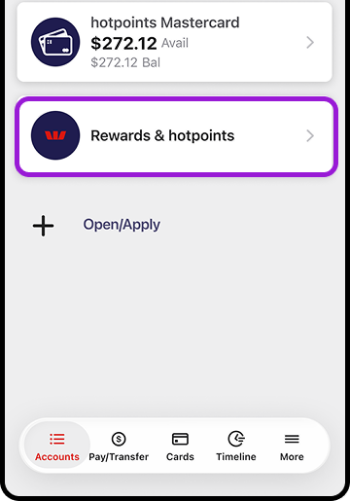
- Or go to More, then choose Rewards.
If you don’t have a hotpoints card, you’ll go to Westpac Rewards - Mastercard Presale Tickets to check out the latest presale and preferred ticket offers, but you won't have cashback offers to find and use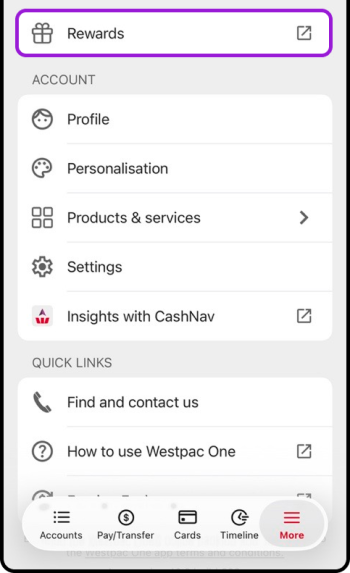
-
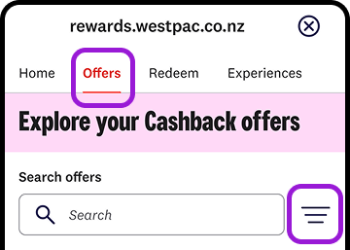
If you have a hotpoints card, scroll to Cashback offers for you or choose Offers from the top menu. You'll also find a range of international offers for other countries, which you can use if you're planning a trip or on holiday
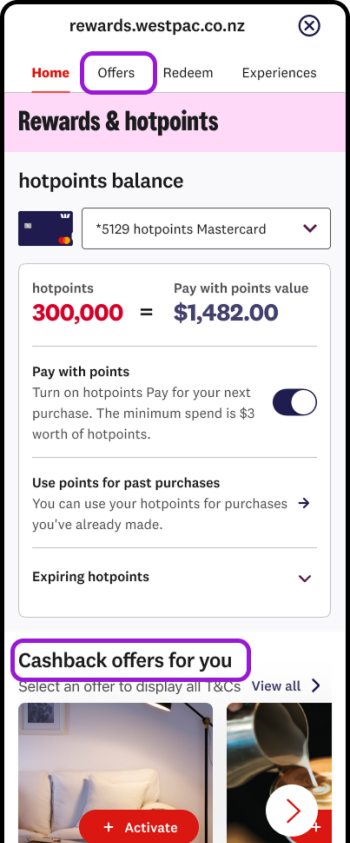
- To find or filter offers:
- On the Offers screen, type in the Search offers box, or
- Choose the filter icon to filter the offers by country or type of offer
- Choose an offer by selecting + or + Activate. Some may already say Ready to use
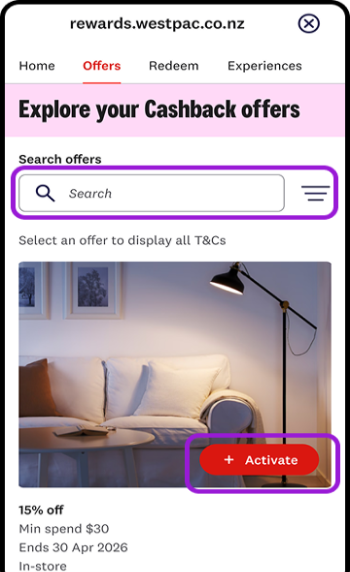
- Check you meet the conditions on the offer and remember to use your hotpoints credit card when you pay, so you'll qualify to get your cashback. Select the image or text under the image to read the full offer conditions.
In online banking:
- Go to Accounts and scroll down to Rewards & hotpoints
- Go to Cashback offers for you
- To find or filter offers:
- Type in the Search offers box
- Choose a Location to filter by country
- Choose a type of offer (like entertainment, travel or fashion)
- Choose an offer by selecting + or + Activate. Some may already be Ready to use
- Check you meet the conditions on the offer and remember to use your hotpoints credit card when you pay, so you'll qualify to get your cashback. Select the image or text under the image to read the full offer conditions.
When you’ll get your cashback.
- The cashback shows as Westpac Rewards Credit on your card transaction history.
- You’ll usually receive the cashback within a few days of making a qualifying purchse, but it could take up to 14 days. If you’ve disputed an offer, allow up to 30 extra days.
- To check your cashback, select Go to your cashback activity.
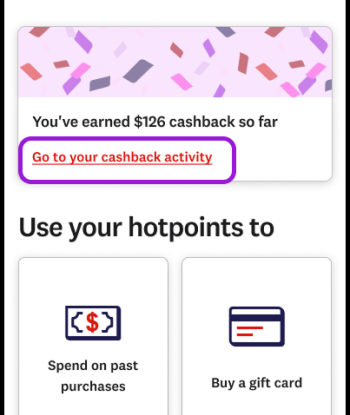
- Cashback credits may take a few days to appear in the list after you’ve made the purchase, and may show here a day or two before they are credited to your account in Westpac One.
How to meet the offer conditions.
To get your cashback, you need to:
- Make sure the offer is activated through Rewards & hotpoints before you spend. It will show as Ready to use
- Spend the required amount and meet other offer conditions specified on the offer page, before the offer expires
- Spend through the right channel (in-store or online) at a participating location
- Pay using your eligible hotpoints credit card
- Pay with your card directly, and not through a payment platform like Afterpay, Zip or PayPal.
Cashback can take up to 14 days to show in your card account. If it’s been more than 14 days, but you did all these things and still haven’t received your cashback, you can contact us, weekdays from 8am to 6pm on 0800 861 862 (+64 9 914 8026 from overseas, international toll charges apply, feel free to call collect) or email contactus@hotpoints.co.nz.
Opting in and out.
If you want to change whether you get offers:
In the app:
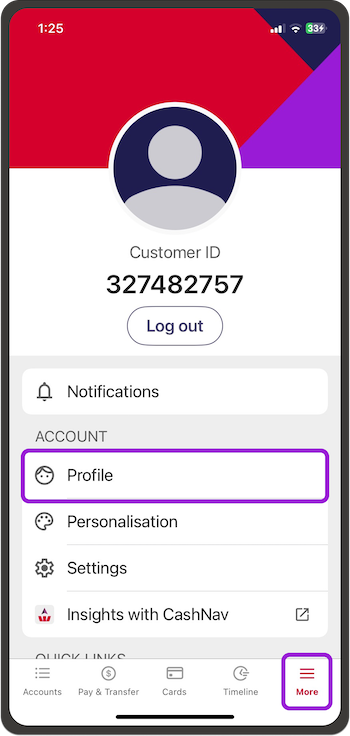
- Go to More, then Profile
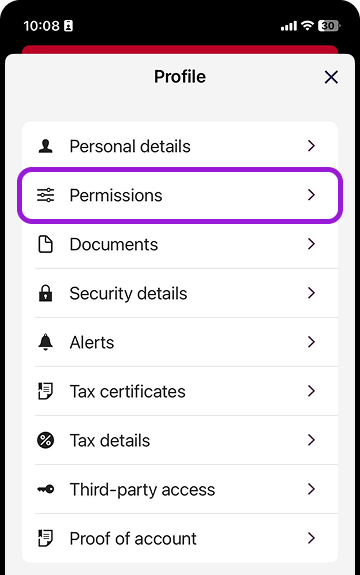
- Choose Permissions
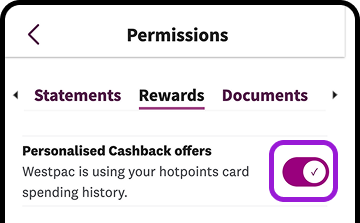
- Go to Rewards then swipe the switch on or off.
In online banking:
- Go to Profile then choose Permissions
- Go to Rewards then swipe the switch on or off.
No cashback offers listed?
- Check you have an eligible hotpoints Mastercard
- You need to be living and using your card in New Zealand
- Go to More> Profile> Permissions > Rewards and check you’ve opted in to receive cashback offers
- After you’ve opted in to receive cashback offers it can take up to 24 hours before your offers appear.
Emails with new offers.
To check you’re opted in to receive our emails about new offers, go to More> Profile> Permissions> Marketing> Rewards/loyalty programmes in the app or online banking.
In the app:
- Go to More, then choose Profile
- Choose Permissions then Marketing
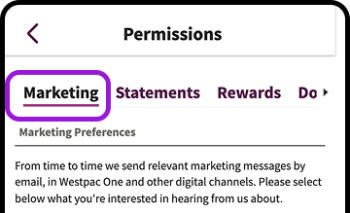
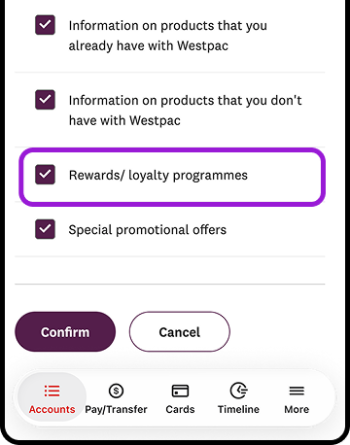
- Tick the box next to Rewards / Loyalty programmes to hear about new offers from us by email. Untick the box if you don’t want to hear from us about rewards and loyalty programmes like hotpoints, or cashback offers by email.
In online banking:
- Go to Profile then choose Permissions
- Choose Marketing
- Tick the box next to Rewards / Loyalty programmes to hear about new offers from us by email.
Untick the box if you don’t want to hear from us about rewards and loyalty programmes like hotpoints, or cashback offers by email.
International cashback offers.
You’ll also have a range of international offers for other countries, which you can use if you’re planning a trip or on holiday.
If you want to check for offers from other countries, go to Offers, then go to the Filter icon and choose a country.
Things you should know.
- Cashback offers are personalised to you based on how you use your Mastercard credit card so may differ from the offers that are available to other people. You can't give your offers to anyone else.
- Cashback payments don’t count towards your minimum monthly credit card payment, so you still need to make the payment as shown on your monthly credit card statement.
- New offers appear in Westpac One® digital banking on the second Wednesday of each month. You may not always have new offers.
- Participating retailers and offers may change from time to time without notice.
- hotpoints card transaction data is used only to assign offers and is processed in line with Westpac and Mastercard privacy obligations. No personally identifiable information is shared with the merchants who provide the offers.
- Credit Card Conditions of Use apply.
