
 Find a branch
 Contact
 Help
Help
How do I book a rate to reinvest my term deposit in Westpac One® digital banking?
Renew your term deposit in Westpac One ahead of time and you’ll get the higher of the booked rate or the advertised rate on renewal day with our rate promise.
In the app:
- From Accounts choose Term investment
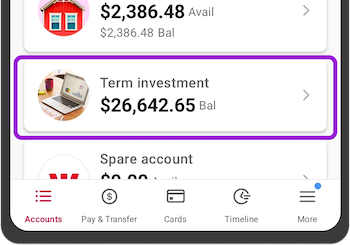
- Choose the term deposit you want and go to Manage
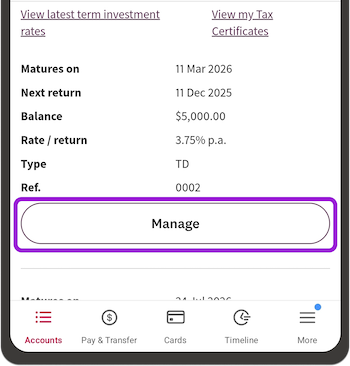
- Check the details on the summary, then scroll down to Change your investment
- Choose how long you want to reinvest for
If you’re within 15 working days of renewal, there will be an interest rate for each reinvestment term.
If you're more than 15 working days away from renewal, you'll only be shown the reinvestment term options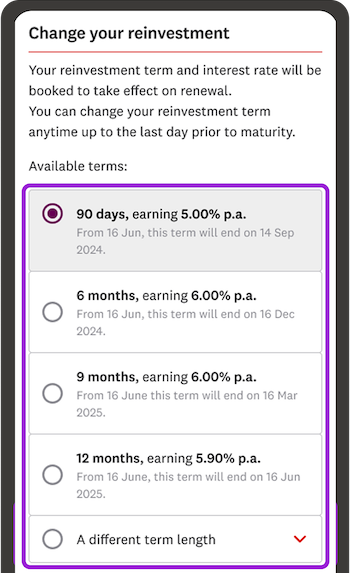
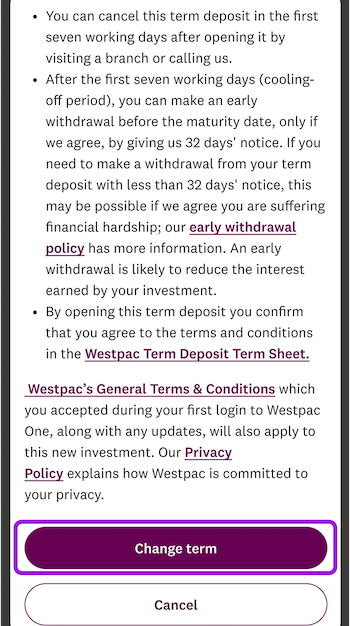
- Check the details, then go to Change term.
In online banking.
- From Accounts choose Term investment
- Choose the term deposit you want, then go to Manage
- Check the details on the summary, then scroll down to Change your reinvestment
- Choose how long you want to reinvest for.
If you’re within 15 working days of renewal, there will be an interest rate for each reinvestment term option.
If you're more than 15 working days away from renewal, you'll only be shown the reinvestment term options - Check the details, then go to Change term.
Our rate promise.
On the term deposit renewal day if the advertised rate for the term you chose is higher than the rate you booked (either in digital banking or with our staff), you’ll get the advertised rate.
If the rate you’ve booked is higher, you’ll get the rate you’ve booked.
Either way, you win.
Things you should know.
- When you choose a term and a rate 15 working days before your investment’s date of renewal, the rate will be booked to take effect on the date of renewal.
- You can make changes up to the last day before renewal.
- The rate promise also applies to your Term PIE investment. However, you need to book the rate of return by calling us or visiting a branch.
- When you renew, there’s a cooling off period of 7 working days should you want make changes to your renewed term investment.
