
 Find a branch
 Contact
 Help
Help
How do I find and share proof of account from the Westpac One® app?
You can easily download, print or share proof of your account from the Westpac One app.
In the app:
- Go to More
- Choose Profile
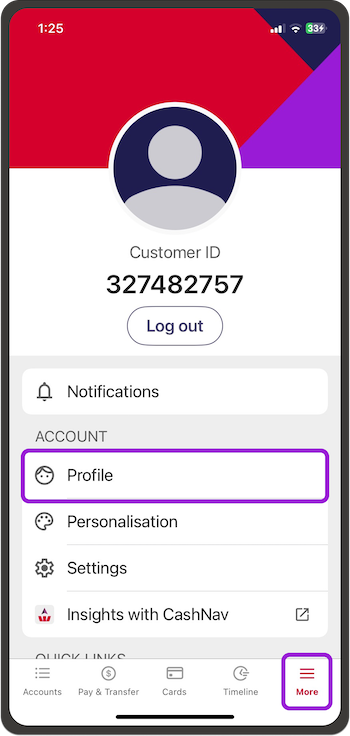
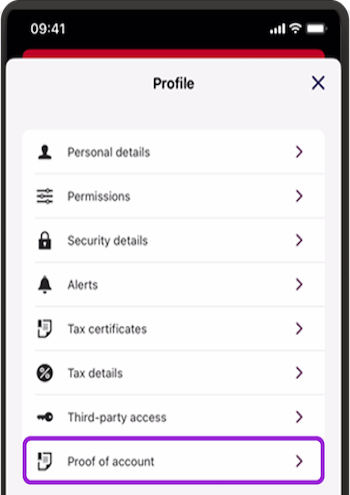
- Then select Proof of account
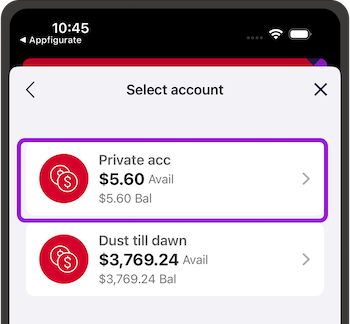
- Select the account you want proof of account for
- Go to the share icon on the top right.
Copy, print, save or share your proof of account document.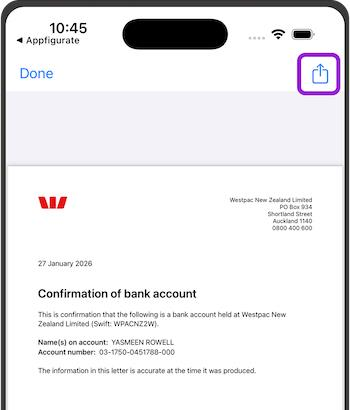
Things you should know.
- Your proof of account is available for accounts you own or manage (for example for a child).
- It shows your name and trading name (if you have a business and have shared it with us).
- If you have a joint account, the names of all account holders are listed.
- You can use the Westpac One app to download, print or share your proof of account for:
- Business Interest, Business Online Saver, Business Transact accounts
- Choices home loans, Westpac Everyday, Non-Profit Organisation (Society Cheque) accounts
- Notice Saver, Bonus Saver, Simple Saver, Easy Access, Online Saver, Save & Win, Solicitors Nominated Trust accounts
- For proof of account for term deposits, foreign currency accounts, personal loans, or wholesale loans, please contact us.
- Proof of account is not available for MastercardTM credit cards or KiwiSaver accounts.
