 Find a branch
 Contact
 Help
Help
How do I view and manage payment status alerts in Westpac One Business?
About payment status alerts.
Set up payment status alerts to get updates when the status of your payment changes. You can choose if you want to receive alerts by:
- Notification
- Both
Emails are sent to the address linked to your account. Alerts appear on your Notifications screen. Only the person who creates the alert will receive it. If multiple people want an update when the status of a payment changes, each person will need to set up their own alert.
You can turn payment status alerts on or off at any time.
View payment status alerts.
1. Select Notifications from the top of the page. 2. Review your alerts in your list of notifications. If action is required, the alert will tell you what to do next.
3. Once you've read an alert, select Got it to remove it from the list.
Set up and manage payment alerts.
- Either:
- From the top of the page, select your profile icon, then Manage alerts.
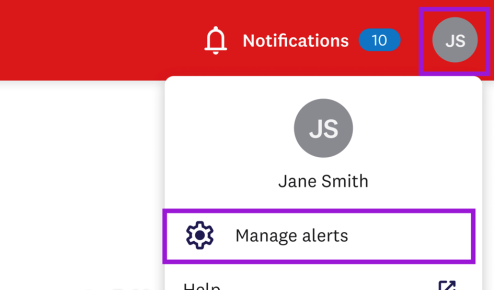
- From the Notifications page, select Manage alerts.

- From the top of the page, select your profile icon, then Manage alerts.
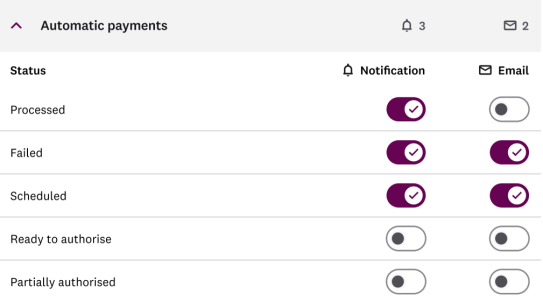
- Select the payment type you’d like to manage alerts for.
- For each payment status, choose whether to get alerts. You can select:
- Notification to receive an alert that appears on your Notifications screen in Westpac One Business
- Email to have an alert sent to the email address associated with your account
- Both to receive a notification and an email.