
 Find a branch
 Contact
 Help
Help
How do I edit payments in Westpac One Business?
Edit payments.
You can edit a draft payment, a payment that’s waiting for approval by you or someone else, or an approved payment that’s scheduled but hasn’t been processed. If you edit a payment that’s already been approved, it will cancel the existing approval and restart the approval process.
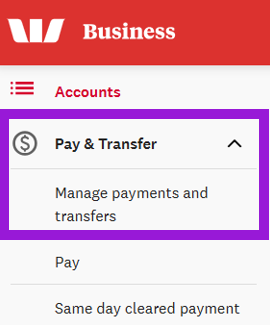
- From the left-hand menu, select Manage payments and transfers.
- Select either Your approval, Pending, or Drafts, then find the payment you want to edit.
- Select Edit and make your changes.
- Select Next to review your changes, then select Continue to submit the payment. Then:
- If you can approve payments and only one authoriser is needed, the payment is submitted then moves to the Processed tab once the payment is complete.
- If you can approve payments and two authorisers are needed, the payment moves to the Pending tab with the status Other approval required.
- If you can’t approve payments, the payment moves to the Pending tab with the status Other approval required.